


Buying a domain name takes about 5 minutes. The questions that cost money come later: what year 2 costs, whose name is on the record, and how hard it is to leave. This post answers them with a price check of registrar pages that we ran on 4 November 2026, plus short quotes from ICANN.
In brief
- A domain name is registered for a term, not bought outright. You keep it by renewing it.
- The registrant on record is, in practice, the holder of the name. It is not whoever paid the invoice.
- In our check, 6 registrars showed every .com figure needed for a 5-year total. Only 1 gave a firm set for .com.au.
- Year 2 can cost more than twice year 1. Transfers face 2 different 60-day rules, and ICANN is reviewing its Transfer Policy.
What buying a domain name actually gets you
A domain name is the web address people type to find you. The domain name system turns that name into the numeric address of the server that holds your site.
Three parties sit behind it:
- The registry runs the extension, such as .com.
- The registrar is the company you pay and deal with afterwards.
- The registrant is the person or business named on the record.
ICANN sets policy for .com and similar extensions. It defines the last role plainly: ‘A domain name registrant is an individual or entity who registers a domain name.’ ICANN’s registrant-rights page, a 2011 text on the 2009 Registrar Accreditation Agreement, uses a second name for the same role: ‘a Registered Name Holder (also known as a Registrant)’.
ICANN’s pages do not call that person the owner. The wording is ours: the registrant is the party the registry treats as the holder of the name. That distinction matters again further down.
It also answers a question people search for: can you buy a domain name permanently? You cannot. Domain name registration runs for a term, and you keep the name by renewing it. That makes it closer to a licence than a purchase.
The steps from search box to registered name
The mechanics are the same at every registrar.
- Search for the name and check domain availability.
- Pick a domain registrar and read the renewal price, not only the first-year price.
- Enter the registrant details. Use the business or person who will answer for the name.
- Decide on domain privacy, which hides your contact details from public lookups.
- Choose the term and pay.
- Confirm the email the registrar sends you.
Two ICANN lines are worth knowing before step 3. The holder must provide ‘accurate and reliable contact details’ and ‘promptly correct and update them’. ICANN’s page on registrant responsibilities adds: ‘You must respond to inquiries from your Registrar within fifteen (15) days, and keep your Registrar account data current.’
If you set the name to renew automatically, ICANN says ‘you must also keep your payment information current’.
What a domain costs over 5 years: our price check of 4 November 2026
We read the public pages of registrars on 4 November 2026 with a standard fetch and no workarounds. Currencies are left as each page showed them, and we have not converted any. Tax treatment differs by country: US prices usually exclude sales tax, UK prices often include VAT, and Australia and Canada use GST. We make no claim about how tax applies to any figure below. Prices change, so treat this as a dated snapshot, not a quote.
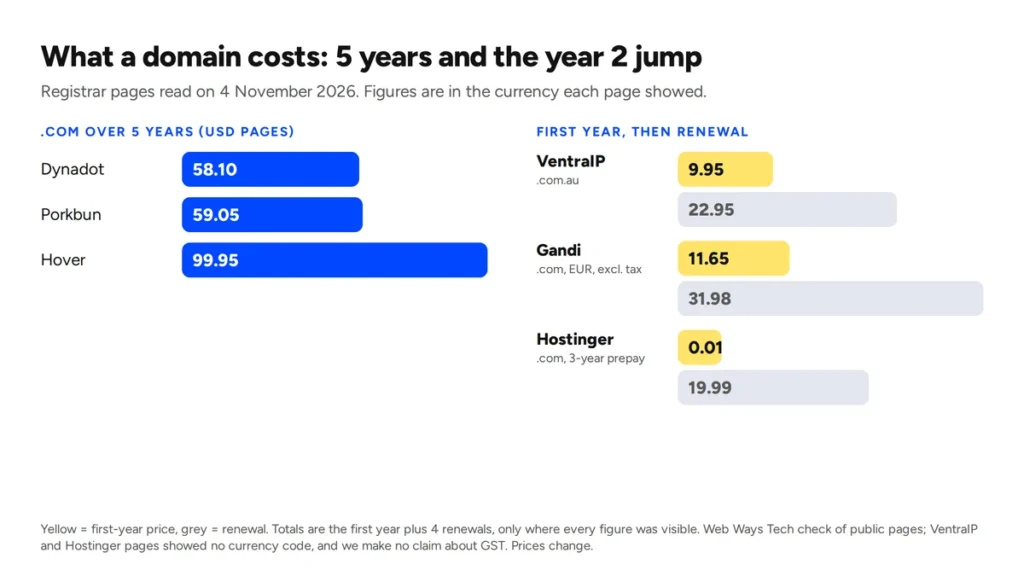
The full set, a first-year price plus a renewal price, was visible for 6 registrars on .com. On .com.au only 1 gave a set that was not tied to an undated sale. Other pages hid a figure, showed a time-limited promotion or refused our request. A 5-year total below is the first year plus 4 renewals.
| Registrar (.com) | First year | Renewal | 5 years | Currency and tax as shown |
| Porkbun | 11.81 | 11.81 | 59.05 | USD; the page says it includes ICANN and other fees |
| Dynadot | 11.62 | 11.62 | 58.10 | USD; tax not shown |
| Hover | 19.99 | 19.99 | 99.95 | USD; tax not shown |
| Hostinger | 19.99 standard | 19.99 | 99.95 | dollar sign, no code; tax not shown |
| VentraIP | 24.95 | 24.95 | 124.75 | dollar sign, no code; GST not shown |
| Gandi | 11.65 | 31.98 | 139.57 | EUR; taxes excluded |
For .com.au, only VentraIP showed every figure.
| Registrar (.com.au) | First year | Renewal | 5 years | Currency and tax as shown |
| VentraIP | 9.95 promotional | 22.95 | 101.75 | dollar sign, no code; GST not shown |
Porkbun lists .com.au at 13.70 regular or 8.41 on sale, for both registration and renewal. The page shows no end date for the sale, so we did not build a total. Webcentral showed a first-year price only.
Privacy and transfer prices vary. Porkbun and DreamHost say privacy is free, and Dynadot includes it. Most other pages showed no figure for .com. Transfers cost the same as registration at Porkbun, Dynadot, and Hover. Hostinger lists 9.99, VentraIP lists .com.au transfers as free, and Gandi lists 11.65 (its transfer conditions are covered below).
Some registrars are missing because their pages did not give us a usable figure. Cloudflare, Squarespace, DreamHost, IONOS, Domain.com and Webcentral showed no renewal price, a placeholder, or a figure we could only find on a third-party site. Namecheap, GoDaddy, Crazy Domains, and others refused our request, which was a limitation of our fetch method. Absence is not a verdict.
The figures are for standard names. Porkbun’s page says its prices are ‘for non-premium single year registrations, renewals and transfers’. Premium domain names are not covered by those figures.
Among the rows labelled USD (Porkbun, Dynadot and Hover), 5-year totals run from 58.10 to 99.95. Gandi’s total is in euros and excludes tax, and VentraIP’s page names no currency, so we have not set them against the rest. Read the renewal line on the registrar’s own page before you pay.
The second-year jump and the cheap first year
The headline price is often the first year only. Three cases from the check show how.
VentraIP lists .com.au at 9.95 and renewals at 22.95, about 2.3 times higher. Its own footnote explains the gap: an asterisk indicates a promotional first-year price; renewals may differ.
Gandi shows .com at 11.65 euros for the first year and 31.98 for renewal, excluding tax. That is about 2.7 times higher. A renewal of 2 to 9 years drops to 28.78 a year.
Hostinger shows .com at 0.01 for the first year, but only with a 3-year term: ‘$39.99 due today for 3 years’. The low price is a prepayment, and the renewal is 19.99.
Webcentral cut a .com.au first year from 31.95 to 15.95. Its terms limit the offer. It ‘Applies to new .com.au and .net.au 1-year domain registrations only, not renewals, transfers or backorders.’ We could not see its renewal price.
Not every registrar works this way. Porkbun’s .com page says: ‘The price you see is the price you pay, year after year.’
So can you buy a domain for $1? In our check, a near-zero price came with a condition. Hostinger needed 3 years paid up front. To read any promotional price:
- Find the renewal line before the first-year line.
- Look for an asterisk or the words ‘first year only’.
- Check the minimum term behind the offer.
 Who the domain is registered to, and how to check in a minute
The same page is direct. ‘Whoever is listed as the Registered Name Holder must provide full contact information, and is the Registered Name Holder of record.’ In our words, whoever is on that record is treated as the holder of the name. The sentence says nothing about who paid.
That is where trouble starts. A developer, an agency, a relative, or an employee sets up the name and enters their own details. The site runs for years. Then that person moves on, and you find you are not the registrant.
To check:
- Log in to the registrar account that holds the name. If you do not know which one it is, ask whoever set it up.
- Read the registrant name and email address.
- If either is not yours, ask the registrar how to change the registrant. A change can start the 60-day lock covered below, so do it early and ask about the opt-out.
Keep a copy of the terms. ICANN says you are ‘entitled to review this Registration Agreement at any time, and download a copy for your records’.
We work to the same rule. On a WordPress build where the domain stays in your name, the registrant record shows the business, not the studio, and the admin logins come with it.
Domain, hosting, and website are three separate things
The domain is the name. Hosting is where the site’s files live. The website is the pages, design, and content on top. You can buy all 3 from different companies and point the name at the host through DNS settings.
| Part | What it is | You pay | Whose name it should be in |
| Domain | The name people type | A registrar, per term | The business that depends on it |
| Hosting | The server space that holds the site files | A host, monthly or yearly | The same business |
| Website | The pages, design, and content | A builder, usually once | The same business |
Splitting them is fine. The risk is not knowing which account holds which part, or finding that one of the 3 is in someone else’s name.
Moving a domain: the lock, the auth code and the timing
ICANN’s Transfer Policy, updated on 21 February 2024, holds 2 rules that guides often merge into one ‘locked for 60 days’.
- After a change of registrant, ‘The Registrar must impose a 60-day inter-registrar transfer lock following a Change of Registrant’ (section II.C.2). The registrar may let the holder opt out of the lock before the change request.
- After creation, a registrar may refuse a transfer (section I.A.3.7.5). The ground is a transfer ‘requested within 60 days of the creation date as shown in the registry RDDS record for the domain name’. That is a ground for refusal, not a lock.
To move a name, you also need the code, often called the auth code. The policy requires registrars to give the Registered Name Holder the unique AuthInfo code. The same section sets a 5-calendar-day limit for lifting the transfer block after your request. We read that limit as applying to registrars without a self-service tool, so follow your registrar’s own steps.
In practice:
- Check how long ago the name was registered or the registrant changed.
- Unlock the name and get the code at the current registrar.
- Start the transfer at the new registrar and enter the code.
- Confirm the emails both registrars send.
Registrars add their own terms. Gandi says a transfer ‘Renews the domains for the minimum allowed duration’ and is possible ’60 days minimum after domain registration’.
ICANN is reviewing its Transfer Policy. Read the current Transfer Policy page, or your registrar’s help page, before you plan a move.
What happens if a .com name expires
This section covers .com, which falls under ICANN’s policy.
ICANN’s Expired Registration Recovery Policy, updated on 21 February 2024, sets a floor. Registrars ‘must notify the Registered Name Holder of the expiration at least two times’. The holder at expiration ‘must be permitted by the registrar to renew the expired registration’. Registries ‘must offer a Redemption Grace Period’ of 30 days (sponsored extensions are excepted). Registrars ‘must permit’ the holder to redeem a deleted registration during it, where the registry offers one.
So the stages are:
- Reminders before the name expires.
- A chance to renew after it expires.
- A 30-day redemption period after deletion.
We have not checked any of this for .au, .co.uk or .ca names, so ask your registrar. VentraIP’s renewal page gives one registrar’s own rules. Its AU names ‘can only be renewed for up to 5 years’. It also says auto-renewal is off by default, and ‘renewal purchases are final and cannot be reversed in the system’.
Auto-renew helps only if the card on file still works. Put the expiry date in your calendar as well.
Extensions, the Australian note and a checklist before you pay
The extension after the last dot is the top-level domain, or TLD, also called a domain extension: .com, .net, .au. Prices differ by extension and by registrar, so compare the same extension line by line.
Australia adds its own layer. auDA’s .com.au page says .com.au domain names ‘can be held by commercial entities registered to trade in Australia or that hold an Australian trade mark’. The registration rules for .com.au are a topic of their own, so we leave them out here. Check auDA’s page, or ask your registrar, before you pick a .com.au name.
The UK’s .co.uk and Canada’s .ca have their own registration rules too, which this post does not cover. Check the registry’s own pages (Nominet for .co.uk, CIRA for .ca), or ask your registrar, before you pick one.
Before you pay:
- Read the renewal price, not the first-year price.
- Check the minimum term behind any offer.
- Put the business or person who will answer for the name in the registrant fields.
- Use an email address that the holder controls.
- Turn on auto-renew or set a calendar reminder, and keep payment details current.
- Keep the registrant details accurate. ICANN expects it.
- Learn how to get the auth code before you need it.
- Write down which account holds the name and who can log in.
Prices in this post were read on 4 November 2026 and will change. Check the registrar’s page before you buy.