If you want to use Claude in your own app or script, you need an Anthropic API key. The process takes less than five minutes. Here is exactly how to do it.
What Is an Anthropic API Key?
An API key is a unique string that identifies your account when you send requests to Anthropic’s servers. Every time your code calls the Claude API, it passes this key so Anthropic knows who is making the request and what usage to bill.
Without a valid key, your requests will return an authentication error.
Step 1: Create an Anthropic Account
Go to console.anthropic.com and click Sign Up. This redirects to the Anthropic developer console at platform.claude.com, which is the same platform under a new name.
You can register with a Google account or an email address. If you already have an account, just log in.
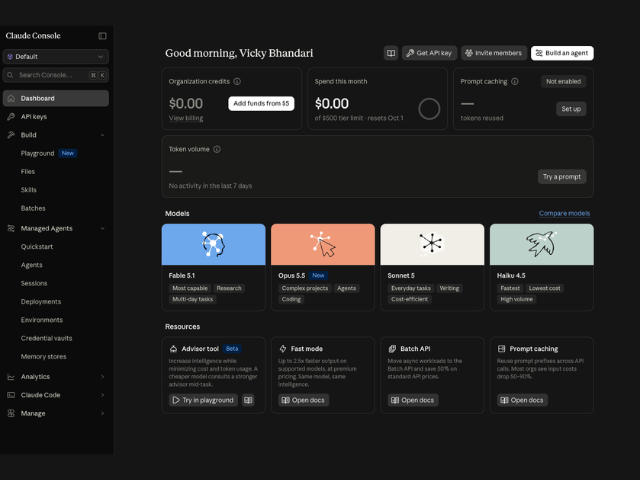
Note that this is a separate account from a claude.ai chat subscription. A Claude Pro or Max plan does not give you API access. The API runs on its own account and its own billing.
Also read our guide on using Claude AI for free.
Step 2: Complete Phone Verification
Anthropic requires a phone number to activate your account. Enter your number and confirm the code sent to you.
This is a one-time step. You will not need to repeat it.
Step 3: Go to the API Keys Section
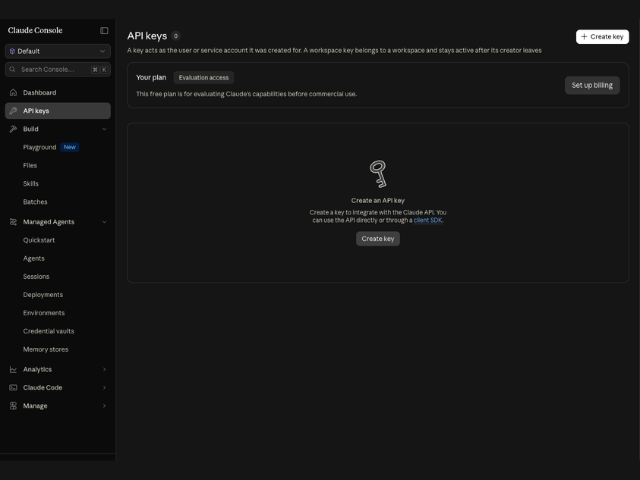
After logging in, look at the left sidebar and click API Keys.
You will land on a page that lists all the keys tied to your account. On a new account, this list is empty.
Step 4: Create a New Key
Click Create Key.
Give the key a name that tells you what it is for. For example, use names like my-python-script or test-project. A clear name saves you time later when you want to revoke or rotate keys.
Click Create to confirm.
Step 5: Copy and Save the Key
Anthropic shows your key only once. Copy it immediately and store it somewhere safe, like a password manager or a .env file in your project.
If you close the window without copying it, you will need to delete that key and create a new one.
Step 6: Add Billing to Start Using the API
The Claude API runs on a prepaid credit system. A brand new key will not process requests until you add credits, even if you plan to spend very little.
Go to Settings, then Billing, and add a payment method. Purchase credits, with a minimum top-up of $5. Some new accounts receive a small amount of free promotional credit, but this is not guaranteed for every account, and it typically expires after a couple of weeks, so do not rely on it.
There is no free tier for ongoing API use. A Claude Pro or Max subscription does not include API credits either. Anthropic charges per token, and for most small projects and experiments, costs stay very low. You can set a monthly spending limit in Billing to avoid surprises.
What Your API Key Looks Like
A valid Claude API key starts with sk-ant-. If the string you copied does not start with that prefix, you copied the wrong thing.
How to Use Your API Key Safely
Never paste your API key directly into your source code, especially if that code goes into a public repository. Instead, store it as an environment variable.
On Mac or Linux:

export ANTHROPIC_API_KEY="your-key-here"

In a .env file (for most frameworks):

ANTHROPIC_API_KEY=your-key-here

Then read it in your code:

Python:

import os

import anthropic

client = anthropic.Anthropic(api_key=os.environ.get("ANTHROPIC_API_KEY"))

Node.js:

import Anthropic from "@anthropic-ai/sdk";

const client = new Anthropic({ apiKey: process.env.ANTHROPIC_API_KEY });
Test Your Key With a Quick API Call
Once you have your key set up, run this to confirm everything works:
Python:

import anthropic

client = anthropic.Anthropic()

message = client.messages.create(

    model="claude-sonnet-5",

    max_tokens=1024,

    messages=[{"role": "user", "content": "Say hello."}],

)

print(message.content[0].text)

If you get a response back, your key is working.
What to Do If Your Key Stops Working
A few reasons your key might fail:
- You hit your usage limit. Check your billing settings and increase the limit or add credits.
- The key was deleted or rotated. Go back to the API Keys page and create a new one.
- Wrong environment variable name. Double-check that your code reads ANTHROPIC_API_KEY and that the variable is actually set in the environment where your code runs.
Frequently Asked Questions
Is the Anthropic API free?
No, not for ongoing use. The API runs on prepaid credits, with a $5 minimum purchase. Some new accounts get a small amount of free credit to test, but this isn’t guaranteed and expires quickly. Usage is billed per token, and costs depend on which model you use and how much text you send and receive.
Can I create more than one API key?
Yes. You can create multiple keys for different projects. This makes it easy to revoke access for one project without affecting the others.
What happens if someone gets hold of my key?
They can make API calls billed to your account. If this happens, go to the API Keys page immediately, delete the compromised key, and create a new one. Also check your usage logs for unexpected activity.
Which Claude model should I use?
For most use cases, Claude Sonnet is a good starting point. It balances speed and quality well. Anthropic also offers Opus for the most demanding reasoning and coding tasks, and Haiku for the fastest, cheapest responses. Check the Anthropic model docs for a current comparison, since model names and pricing change over time.
Next Steps
Now that your key is ready, you can start building with the Claude API. A good next step is reading the Anthropic quickstart guide to see a full working example from scratch.