If you’ve been managing WordPress sites on shared hosting or raw VPS and wondering whether RunCloud is worth it — I’ve been there. After three years of running every single one of my production sites on a DigitalOcean + RunCloud combo, here’s my experience. No affiliate fluff, no sponsored angle.
My Hosting Journey Before RunCloud
I didn’t jump straight to RunCloud. I went through the full stack first:
- Hostinger and Hostinger — budget shared hosting, fine for side projects, terrible for anything serious
- Hetzner and Vultr — raw VPS, full control but full responsibility too. Every server config, every Nginx tweak, every SSL renewal was manual. It worked, but it was time I didn’t have.
The problem with raw VPS isn’t capability — it’s overhead. When you’re managing multiple sites across client work and your own projects, you don’t want to be SSHing into servers to debug PHP-FPM configs at midnight.
That’s what pushed me toward RunCloud.
What RunCloud Actually Is
RunCloud is a server management panel built specifically for PHP and WordPress sites on cloud VPS providers. You connect it to your DigitalOcean (or Hetzner, Vultr, AWS, etc.) server, and it gives you a clean UI to manage:
- Web applications and domains
- PHP versions per app
- SSL certificates (Let’s Encrypt, one click)
- Nginx/Apache config
- Database management
- Cron jobs
- SFTP users
- Backups
It sits between you and the raw server. You still own the VPS — RunCloud just makes it manageable without living in the terminal.
Three Years In: What’s Actually Good
1. The UI is genuinely clean
This sounds obvious, but it isn’t. Most server panels feel like they were designed in 2009 (cPanel, I’m looking at you). RunCloud’s interface is modern, logical, and fast. Everything is where you’d expect it to be. After three years, I still don’t feel like I’m fighting the UI.
2. PHP version management per app
This one matters more than people realize. If you’re running multiple WordPress sites, chances are they’re on different plugin ecosystems with different PHP requirements. RunCloud lets you set PHP version per web application, not per server. You can have one app running PHP 8.1 and another running PHP 8.3 on the same server without any conflicts.
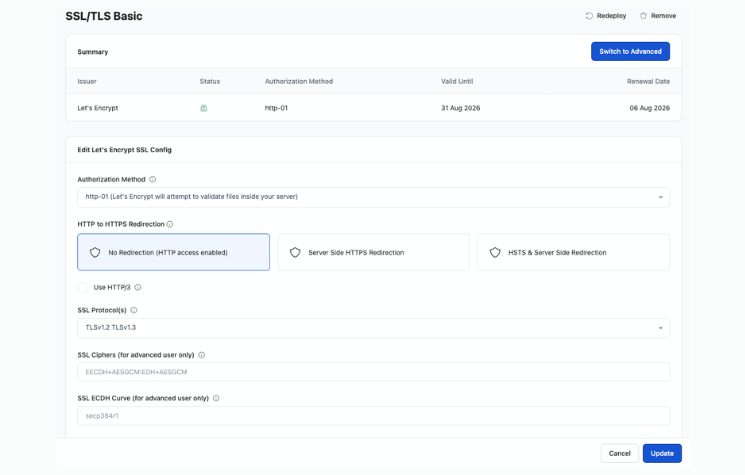
3. SSL is zero friction
Let’s Encrypt SSL, one click, done. Renewals are automatic. In three years, I have never had an SSL-related incident on any RunCloud-managed server.
4. Switching to DigitalOcean was the right call
RunCloud and DigitalOcean work together well enough that I moved everything — every client site, every personal project — to this combo. The $6–$12/month DO droplets handle light-to-medium traffic easily, and RunCloud’s resource monitoring gives you enough visibility to know when to scale up.
5. Support is solid
I’ve raised a few tickets over three years. Response times were reasonable, and the answers were actually useful, not copy-pasted docs links.
The One Real Issue I’ve Encountered
When you resize a DigitalOcean droplet, say you upgrade from a 2GB to a 4GB server — RunCloud takes a few days to reflect the new server specs in the dashboard. The server itself works fine with the new resources immediately, and you can force the sync manually via SSH, but that defeats the purpose of having a management panel in the first place.
The fix exists, but it shouldn’t require you to drop into the terminal for something as routine as a server resize. This is exactly the kind of thing RunCloud should handle automatically: detect the new specs from the provider API and update the dashboard without user intervention.
It’s a small gap in an otherwise seamless experience, and honestly one of the few moments where you’re reminded you’re still one abstraction layer away from the raw server. Although the size- indeed, the new one I mean resized one, but till it updates you can’t understand the usage stats, etc.
Not a dealbreaker by any stretch. But if the RunCloud team is reading this, automate that sync.
RunCloud vs The Alternatives
1. RunCloud vs Cloudways
Cloudways manages the server for you; you’re essentially renting a managed layer on top of DO/Vultr/etc. RunCloud gives you the panel, but you own and pay for the VPS directly.
Cloudways is easier to start with. RunCloud is cheaper long-term and gives you more control. If you’re running more than 3-4 sites, RunCloud’s economics start making more sense.
2. RunCloud vs cPanel
cPanel is bloated, expensive (pricing jumped massively a few years ago), and feels dated. RunCloud is purpose-built for modern PHP/WordPress stacks. There’s no comparison for someone running a lean operation.
3. RunCloud vs raw VPS
If you enjoy server administration and have the time, raw VPS is the most flexible. But if you’re a developer or entrepreneur who wants the server to just work so you can focus on the actual product, RunCloud removes that overhead cleanly.
Pricing
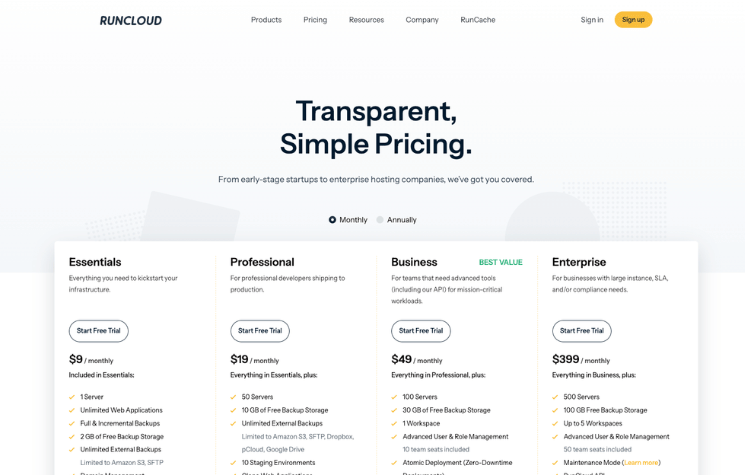
RunCloud’s Professional plan covers unlimited servers and unlimited web apps. For anyone running more than one or two sites, this is the plan that makes sense — the per-server pricing on lower tiers adds up fast.
Check their current pricing at runcloud.io, as it does get updated.
Who RunCloud Is For
- Developers and agencies managing multiple WordPress or PHP sites
- People who want VPS control without full sysadmin overhead
- Anyone who’s outgrown shared hosting but doesn’t want to manage raw servers
- Teams running DigitalOcean or similar cloud VPS who want a clean management layer
Final Verdict
Three years. Every production site migrated to this stack. Zero regrets.
RunCloud isn’t the cheapest option, and it isn’t the most hands-off option. It’s the right balance of control, usability, and cost for anyone who takes their web infrastructure seriously but doesn’t want server management to be a full-time job.
The DigitalOcean + RunCloud combo has become my default recommendation for anyone asking how to host WordPress properly without Cloudways pricing or cPanel bloat.
If you’re on shared hosting and your sites are growing, or you’re on raw VPS and spending too much time on server management, RunCloud is worth every rupee.